Chrome extension for recruitment teams
See who’s off-limits before you press send.
Bycatch is a Chrome extension that flags candidates at your off-limits companies, right on their LinkedIn profile. Your whole team sees the same list, and candidate data never leaves your browser.
Free for your first month. From £30/month for teams of up to 5.
Trusted by recruitment teams at



See it in action
Thirty seconds, start to finish
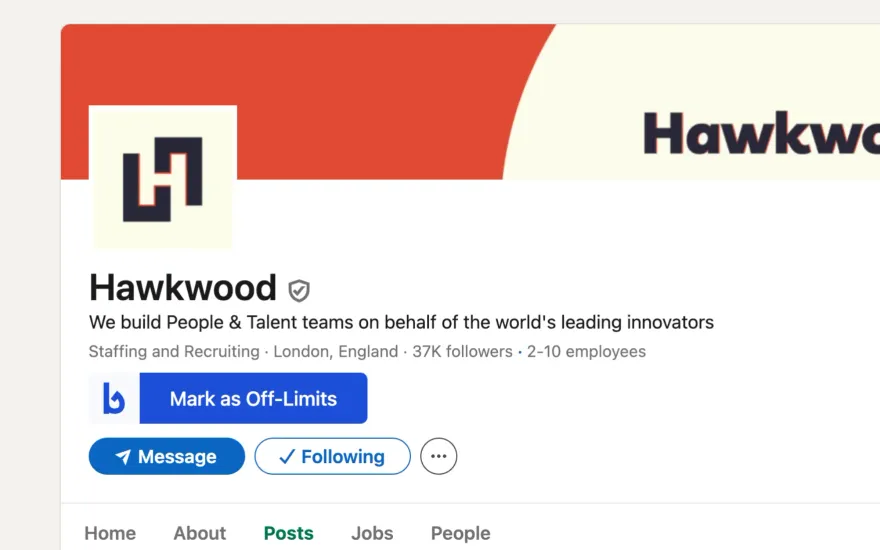
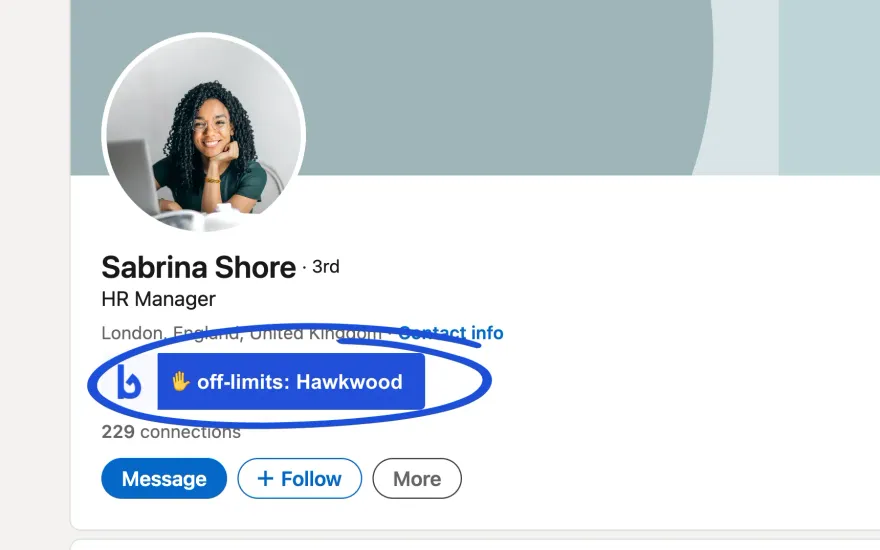
Mark a client off-limits from its LinkedIn page, open a profile at that company, and see the badge before you press send.
How it works
Your hands-off list, enforced on every profile
It takes one click to mark a company off-limits. From then on, every recruiter on your team sees the flag on every profile that works there, in LinkedIn and LinkedIn Recruiter.
Mark a company off-limits
From its LinkedIn page with the "Mark as Off-Limits" button, or from the Bycatch dashboard. New joiners inherit the whole list on day one.
Everyone sees the flag
Anyone at an off-limits company gets a badge on their profile before you reach for the message button. It works in LinkedIn and LinkedIn Recruiter.
Candidate data stays in your browser
Bycatch reads the profile on your screen and flags it locally. It never logs or sends who you looked at. The only thing it shares is which companies are on the list.
profile.view  sabrina-shore
company       Hawkwood
list match    yes · badge shown
sent to server  0 bytes
stored        nothing
Why Bycatch
Built for the way recruiters actually work
Works where you work
Bycatch is a Chrome extension that places a notification on the LinkedIn profile of candidates working for off-limits companies. No clicking back to a spreadsheet or CRM before you send a message, and no new tool to learn.
Full team visibility
It takes a second to mark a company as off-limits, and instantly your entire team knows which candidates they can’t approach. New joiners inherit the list on day one.
Candidate data never leaves your browser
Bycatch reads the profile on your screen and flags it locally. It doesn’t log, store or send the candidates you look at anywhere. The only thing it shares is which companies are which, never who you viewed.
Testimonials
Recruitment teams love Bycatch
“Bycatch has made the Talent lives super easy to identify when sourcing companies in which we cannot target talent from, globally! Not only is it super easy to use – the Global Talent Team can add & remove to/from the list making the upkeep super easy. The widget is so handy!”
“This is a great, simple tool for recruitment agencies. We previously had to manually check a central spreadsheet of clients which was fiddly and time consuming. Ensure you don't cause issues with existing clients by enabling the wider team to quickly know if a prospective candidate is working in an off-limits company.”
Pricing
Simple pricing that scales with your team
One flat monthly price for your whole team, not per seat. Free for your first month; no credit card required.
| Plan | Team size | GBP / month | USD / month |
|---|---|---|---|
| Starter Most teams | 1–5 users | £30 | $40 |
| Growth | 6–15 users | £45 | $55 |
| Business | 16–50 users | £60 | $75 |
| Enterprise | 51–100 users | £90 | $115 |
| Custom | 100+ users | Custom | Custom |
- Free for first month
- Works on LinkedIn & LinkedIn Recruiter
- Real-time off-limits list updates
- Responsive customer support
No credit card required. Custom plans available for 100+ users.
FAQ
Frequently asked questions
Everything you need to know about sharing your off-limits list with Bycatch.
What is an off-limits list?
An off-limits list (sometimes called a hands-off list) is the set of companies a recruitment team has agreed not to source candidates from. That usually means current clients, former clients within a protection period, or other companies in your own group. Bycatch makes that list visible to your whole team directly on LinkedIn, so nobody accidentally approaches a protected candidate.
Can I integrate Bycatch with my existing systems?
Yes, Bycatch integrates seamlessly with LinkedIn, including the LinkedIn Recruiter product. Once the Chrome extension is installed, off-limits flags appear directly on candidate profiles as you browse.
Will it take me long to get started?
It only takes a minute to add our Chrome extension, enter some log-in details and invite your team. From there, you and your team can add your off-limits companies within LinkedIn itself or via your Bycatch dashboard.
Can I share my off-limits list with the rest of my team or company?
Yes, this is the central feature of Bycatch. Within your Bycatch dashboard, you can invite your team via email with a few clicks. When anyone marks a company as off-limits, the whole team sees it instantly.
Does Bycatch store the candidates we look at?
No. The extension reads the LinkedIn profile on your screen and flags it locally in your browser. It does not transmit the name, profile address, employment history or any other details of the people you view. The only thing it shares is which company logo belongs to which company, so flags can be shown faster. That describes companies, not people.
Is Bycatch safe to use under GDPR?
Bycatch is designed so that it never receives personal data about candidates. The personal data we do hold is your team’s account details (name, email) and billing information. Your off-limits list is confidential and is never shared, sold or disclosed to third parties unless required by law. Our privacy policy sets out exactly what the extension does and does not collect.
How do I get support for the product?
Our dedicated support team is here to help. You can reach out through the contact form on our website or send us an email, and we'll be happy to assist with any questions or concerns.
Protect your client relationships from your next search
Set up Bycatch in under two minutes and share your off-limits list with your whole team.
- Free for first month
- No credit card
- Set up in 2 minutes